Utility to Find Gitlab Credit Usage
Through this article, we’re going to explore the GitLab CLI (glab) to help us query compute minutes consumed and remaining.
I created this helper script as I was iteratively making a lot of mistakes on my GitLab runners which was eating into my free 400 minutes that’s given when you sign up. I will now periodically run this to see how close I am and if I need to purchase additional credits.
Creating our own tools and helpers not only save us time in the long-run, but they do way more than that, they teach us more than we would have ever known about what’s available and give us incrementally acquired knowledge on many auxiliary tools and languages that we can flex throughout our careers.
Once complete, the final output should look like the following
Current Date : 2026-05-25
Month Elapsed: 80%
Month Credits: 400

MONTH    CONSUMED  REMAINING  USAGE %
-----    --------  ---------  -------
2026-03       221        179      55%
2026-04       302         98      76%
2026-05       277        123      69%
Disclaimer
Code snippets and scripts provided within this article are strictly for educational and informational purposes. This code is provided “as-is” without any express or implied warranties of any kind. Always review and test scripts in a safe, non-production environment before deployment. See License Note for details on licensing.
Dependencies
Usage of the scripts within this article use two tools that are staples of a GitLab DevOps engineer.
- GNU Bash 4.0+ is required as a shell interpreter. While I do make efforts to use 3.2 compatibility for macOS systems that still use the older shell, I do have a modern 5.x shell that I may have missed some compatibility, and I would encourage you to at least use a modern shell.
- jq is an extremely useful JSON parser tool that allows transforming, navigating and producing output from structured JSON content. This should be a staple of any engineer who works with JSON structures without the need to open up a dependent programming language other than a shell.
- GitLab CLI (glab) provides an excellent Command Line Interface (CLI) to hosted and the cloud hosted GitLab platform. If you’re a regular GitLab user, this should become a core part of your toolkit. NOTE: for those from a GitHub background, this can be thought of as the GitLab equivalent.
Platform Compatibility
While I personally use a macOS system with tooling provided by the MacPorts project to remain current, I make best efforts to try and be platform independent by using POSIX standards and attempts at portability so that these scripts can be used in CI/CD platforms that may be running GLU/Linux. That said I can miss something, please use your best efforts to look for compatibility issues before attempting to run in different environments.
Within this script one known portability is the difference in the BSD Date vs the GNU Date. The script artifact from this article takes this into account and makes an attempt to test the BSD version before the GNU version, you may choose to reverse this.
What’s the Problem?
GitLab provides us with a screen that we can visually inspect our current and past usage history. You can find this by navigating to your group in your GitLab instance and looking under Settings → Usage Quotas and navigate to the “Pipelines” tab.
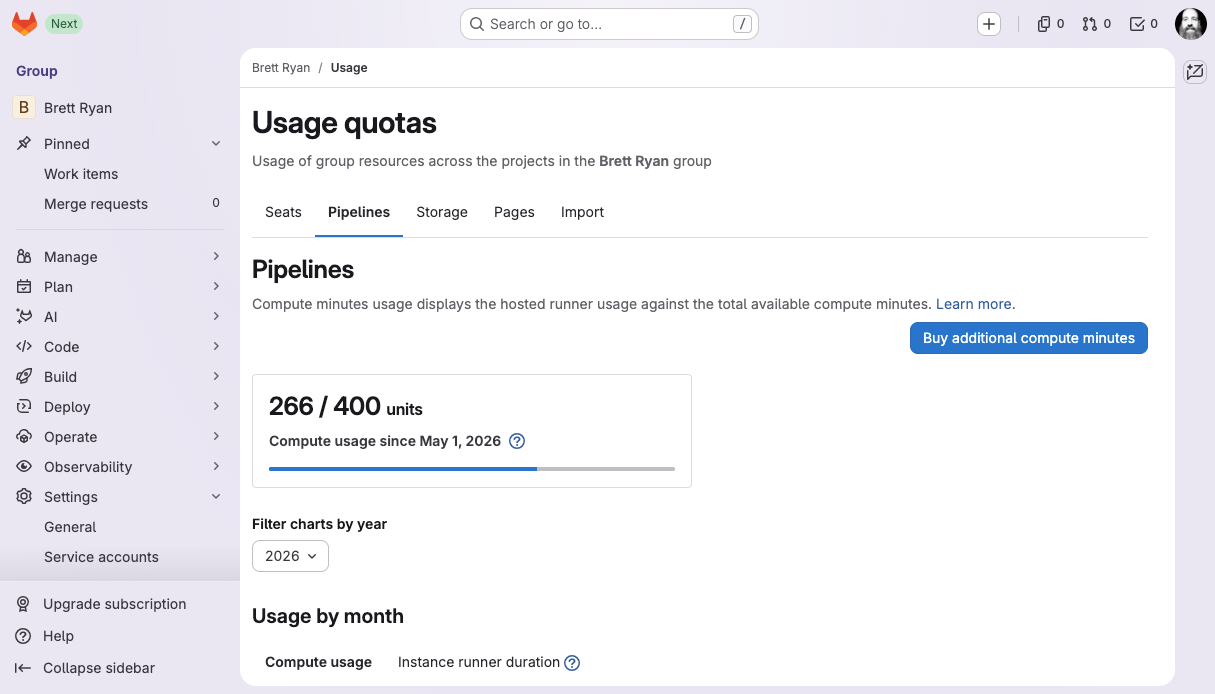
GitLab Group Usage Quotas
Using this ClickOps1 approach to finding information requires us to manually navigate and inspect. We would like to script this so that we as developers can get this information directly in a human friendly way, and; potentially add this to our CI/CD pipeline that could report this after each build.
GitLab GraphQL
We will be using the GitLab GraphQL API to query our usage. One note on the GitLab documentation is a single-page huge document that contains the whole GraphQL documentation and for my system at least, takes a long time to load and searching is near impossible which made writing this article painful, your mileage may vary.
As taken from glab api graphql --help:
If the current directory is a Git directory, uses the GitLab authenticated host in the current directory. Otherwise,
gitlab.comwill be used.
We will be using the Query.ciMinutesUsage to query our usage. We can test this now by performing a query against the group namespace with the following replacing 9999 with your group id:
glab api graphql -f query='{
  ciMinutesUsage(namespaceId: "gid://gitlab/Group/9999") {
    nodes {
      monthIso8601
      minutes
    }
  }
}'
Depending on if you have been using GitLab hosted runners, you should get something like the following:
{
  "data": {
    "ciMinutesUsage": {
      "nodes": [
        {
          "monthIso8601": "2026-05-01",
          "minutes": 266
        },
        {
          "monthIso8601": "2026-04-01",
          "minutes": 302
        },
        {
          "monthIso8601": "2026-03-01",
          "minutes": 221
        }
      ]
    }
  }
}
We could then put this in a script and call it a day, potentially doing basic manipulation to limit with 1, and grep for minutes and call it a day:
#!/usr/bin/env bash

gid=9999

glab api graphql --output ndjson -f query='{
  ciMinutesUsage(namespaceId: "gid://gitlab/Group/'$gid'", first: 1) {
    nodes {
      monthIso8601
      minutes
    }
  }
}' | jq -r '.data.ciMinutesUsage.nodes[].minutes'
Here we introduced the first query parameter where this GraphQL query
supports pagination, we then used a basic jq script to extract the minutes
attribute. Since we selected a limit of the first 1 record from GitLab, this
will always be a single element.
Usage History
Showing the consumed capacity is good, but it doesn’t tell us if we started
consuming credits or, if that value is from the prior month. Let’s look at
using the jq command to format this as a table that has the date and the
number of consumed credits for that month.
When we start to get to this sort of processing, I like to place the output
of my command into a variable, and then use that variable to pass as the
input to my jq command. This gives two benefits.
- It’s easier to read and reason about the output of a command and the input to the next command instead of relying on our cognitive capacity to recognise all those chained pipes.
- We can debug the output by echoing it so we can see when something is going awry (as it eventually will), allowing us to solve much faster.
#!/usr/bin/env bash

gid=9999

req='{
  ciMinutesUsage(namespaceId: "gid://gitlab/Group/'$gid'") {
    nodes {
      monthIso8601
      minutes
    }
  }
}'
res="$(glab api graphql -f query="$req")"

# For debugging we can comment and un-comment as needed.
echo "req: $req"
echo "res: $(echo "$res" | jq)"
We can take advantage of the Format strings and escaping
@tsv jq built-in which allows us to take an array of fields and turn it
into a tab separated table of values with each array being represented on a new
line.
echo $res | jq -r '
  .data.ciMinutesUsage.nodes |
    sort_by(.monthIso8601)[] |
    [.monthIso8601, .minutes] |
    @tsv')
This now produces a nice tab-separated-values table for each month. Note that
I’ve also reversed the sort by adding an explicit sort on .monthIso8601.
2026-03-01	221
2026-04-01	302
2026-05-01	277
What is my Limit?
Having a listing of what’s consumed is very helpful in its own right, though; it would be really helpful if we could also display how much we have available for use.
At the time of writing I could not find a GraphQL query that would return the
credits available, but; I did find the glab api /namespaces/$gid gives us
what we need:
DEFAULT_MONTH_CREDITS=400

ns_res=$(glab api /namespaces/$gid 2>/dev/null)
if [ -z "$ns_res" ]; then
  echo "Couldn't find credits, defaulting to $DEFAULT_MONTH_CREDITS"
  month_credits=$DEFAULT_MONTH_CREDITS
else
  echo $ns_res |jq >&2
  blim=$(echo $ns_res | jq -r '.shared_runners_minutes_limit // '$DEFAULT_MONTH_CREDITS)
  elim=$(echo $ns_res | jq -r '.extra_shared_runners_minutes_limit // 0')
  echo "Base: $blim, Extra: $elim"
  month_credits=$((blim + elim))
fi
This will first try to find what credits are associated, if returned the sum of
shared_runners_minutes_limit + extra_shared_runners_minutes_limit if they are
available. Note that we use the jq alternative operator
which will return the left value if it’s not null, otherwise defaults to the
rightmost value.
How Many Credits Remain?
Now that we have the amount of credits consumed, and our credit limit; we can add a column to our table to show how many credits we have left for the month. This will show based on the current credit limit for the prior months.
We will alter our script to ensure that we find available credits before the history table.
DEFAULT_MONTH_CREDITS=400

# Find monthly credits
ns_res=$(glab api /namespaces/$gid 2>/dev/null)
if [ -z "$ns_res" ]; then
  echo "Couldn't find credits, defaulting to $DEFAULT_MONTH_CREDITS"
  month_credits=$DEFAULT_MONTH_CREDITS
else
  blim=$(echo $ns_res | jq -r '.shared_runners_minutes_limit // '$DEFAULT_MONTH_CREDITS)
  elim=$(echo $ns_res | jq -r '.extra_shared_runners_minutes_limit // 0')
  echo "Base: $blim, Extra: $elim"
  month_credits=$((blim + elim))
fi

# Build table of remainders
req='{
  ciMinutesUsage(namespaceId: "gid://gitlab/Group/'$gid'") {
    nodes {
      monthIso8601
      minutes
    }
  }
}'
res="$(glab api graphql -f query="$req")"

echo $res | jq -r '
  .data.ciMinutesUsage.nodes |
    sort_by(.monthIso8601)[] |
    ('$month_credits' - .minutes) as $remaining |
    [
      .monthIso8601,
      .minutes,
      $remaining
    ] | @tsv'
Now we will have an output similar to the following:
Base: 400, Extra: 0
2026-03-01	221	179
2026-04-01	302	98
2026-05-01	277	123
Note that in order for us to pass the $month_credits variable value we had to
close the quoted script and reopen after referring to the variable value. An
alternative would have been to pass the variable as an argument to jq, though;
pay attention that it must be converted tonumber in order to be used in math
expressions.
data=$(echo $res | jq -r --arg credits "$month_credits" '
  .data.ciMinutesUsage.nodes |
    sort_by(.monthIso8601)[] |
    (($credits | tonumber) - .minutes) as $remaining |
    [
      .monthIso8601,
      .minutes,
      $remaining
    ] | @tsv')
For a nice effect, we can now add a percentage to our table:
data=$(echo $res | jq -r '
  .data.ciMinutesUsage.nodes |
    sort_by(.monthIso8601)[] |
    ('$month_credits' - .minutes) as $remaining |
    [
      .monthIso8601,
      .minutes,
      $remaining,
      ((100 * .minutes / '$month_credits' | round | tostring) + "%")
    ] | @tsv')
This will give us a table that contains consumed, remaining and a usage %. Now it would be nice to have headings on this table so we don’t have to remember what each column represents.
In order to achieve this, we will update our script to contain two parts by using the comma operator and a constant array for all our headings:
data=$(echo $res | jq -r '
  (["MONTH", "CONSUMED", "REMAINING", "USAGE %"]),
  (
    .data.ciMinutesUsage.nodes |
      sort_by(.monthIso8601)[] |
      ('$month_credits' - .minutes) as $remaining |
      [
        .monthIso8601,
        .minutes,
        $remaining,
        ((100 * .minutes / '$month_credits' | round | tostring) + "%")
      ]
  ) | @tsv')
When you run this, you will now find the columns are not aligned with the
output. We can fix this by using the column command.
echo "$data" | column -t -s $'\t'
The table doesn’t look bad, though we might like to add underline separators
from the heading to the data. To do this, we can use the comma operator again
within the headings to split its output to the original value and repeat the
- character for the length of the heading. In the following modification,
note we use the identity to print the
heading, then the comma operator, followed by a map(length | . * "-"). What
this is doing is mapping the heading to the length number and multiplying
with a string literal which results in the repeated character.
data=$(echo $res | jq -r '
  (["MONTH", "CONSUMED", "REMAINING", "USAGE %"] | (., map(length | . * "-"))),
  (
    .data.ciMinutesUsage.nodes |
      sort_by(.monthIso8601)[] |
      ('$month_credits' - .minutes) as $remaining |
      [
        .monthIso8601,
        .minutes,
        $remaining,
        ((100 * .minutes / '$month_credits' | round | tostring) + "%")
      ]
  ) | @tsv')
How Much of the Month has Passed?
While we now show percentage used, we could show a percentage of how far we are into the current month. This will allow us to visually see if we might be going over in the current month:
day="$(date +%e)"

days_in_month="$(date -v+1m -v1d -v-1d +%d)"
month_elapsed_pct="$((100 * day / days_in_month))"

echo "Current Date : $(date +%Y-%m-%d)"
echo "Month Elapsed: $month_elapsed_pct%"
This will work great, but; only on a BSD based system. The only way I could think to make this work for a GNU/Linux based system is to first fail with the BSD version and then try the GNU version:
day=$(date +%e)

if ! days_in_month=$(date -v+1m -v1d -v-1d +%d); then
  if ! days_in_month=$(date -d "$(date +%Y-%m-01 2>/dev/null) \
      +1 month -1 day" +%d 2>/dev/null); then
    echo "Could not determine find BSD or GNU compatible date command." >&2
    exit 3
  fi
fi
month_elapsed_pct=$((100 * day / days_in_month))
Tightening things up
While we have something fairly useful that we can call at any time, the script is still fairly basic, and requires us to hard code values. We can first look at moving all the logic to function blocks before adding command line options to manipulate the scripts behaviour.
Move Logic to Functions
While probably unnecessary for this script, it’s a practice I like to do as it allows me to turn features on and off easily, or move call order around if I want the percentage of month elapsed to appear first for example.
GID=
MONTH_CREDITS=400
MONTHS=4

query_usage() {
  glab api graphql -f query='{
    ciMinutesUsage(namespaceId: "gid://gitlab/Group/'$1'", first: '$2') {
      nodes {
        monthIso8601
        minutes
      }
    }
  }'
}

find_credits() {
  local gid="$1"
  local credits="${2:-400}"
  local query_credits="${3:-0}"
  local ns_res elim blim

  if (( query_credits )); then
    echo -n "Querying limits... ">&2
    ns_res=$(glab api /namespaces/$gid 2>/dev/null)
    if [ -z "$ns_res" ]; then
      echo -e "Failed, falling back to defaults.\n" >&2
    else
      blim=$(echo $ns_res | jq -r '.shared_runners_minutes_limit // '$credits)
      elim=$(echo $ns_res | jq -r '.extra_shared_runners_minutes_limit // 0')
      echo -e "Base: $blim, Extra: $elim\n" >&2
      credits=$((blim + elim))
    fi
  fi
  echo $credits
}

show_month_elapsed() {
  local days_in_month month_elapsed_pct
  local day=$(date +%e)

  if ! days_in_month=$(date -v+1m -v1d -v-1d +%d); then
    if ! days_in_month=$(date -d "$(date +%Y-%m-01 2>/dev/null) +1 month -1 day" +%d 2>/dev/null); then
      echo "Could not determine find BSD or GNU compatible date command." >&2
      exit 3
    fi
  fi
  month_elapsed_pct=$((100 * day / days_in_month))

  echo "Current Date : $(date +%Y-%m-%d)"
  echo "Month Elapsed: $month_elapsed_pct%"
}

show_month_remaining() {
  local gid=$1
  local credits=$2
  api_res=$(query_usage $gid 1)
  res="$(echo "$api_res" | jq -r --arg credits "$credits" '
    .data.ciMinutesUsage.nodes |
      sort_by(.monthIso8601) |
      last |
      ($credits | tonumber) - .minutes
    ')"
  echo "$res"
}

show_usage_history() {
  local gid=$1
  local credits=$2
  local months=$3

  echo -e "Month Credits: $credits\n"

  api_res=$(query_usage $gid $months)
  res="$(echo "$api_res" | jq -r --arg credits "$credits" '
    # Helper function to pad strings for right alignment
    def lpad(n): tostring | ("          " + .) [-n:];

    (
      ["MONTH", "CONSUMED", "REMAINING", "USAGE %"] | (., map(length | . * "-"))
    ),
    (
      .data.ciMinutesUsage.nodes |
        sort_by(.monthIso8601)[] |
        ($credits | tonumber) as $credits |
        ($credits - .minutes) as $remaining |
        [
          (.monthIso8601 [:7]),
          (.minutes | lpad(8)),
          ($remaining | lpad(9)),
          ((100 * .minutes / $credits | round | tostring) + "%" | lpad(7))
        ]
    )
    | @tsv')"
  echo "$res" | column -t -s $'\t'
}
I’ve tightened these up a little with some preparation for enabling some command line options. Now we can call each of these as we need.
month_credits=$(find_credits "$GID" "$MONTH_CREDITS" 0)

echo "Remaining: $(show_month_remaining "$GID" "$month_credits")"
show_month_elapsed
show_usage_history "$GID" "$month_credits" "$MONTHS"
Adding Command Line Options
Now that we have a modular approach, we can add some command line options that the user can pass to manipulate the scripts behaviour. We will provide the following options, which; we might as well write out in a help function.
show_help() {
  echo "usage: $(basename "$0") [options]

  -h            : Show this help.
  -c <credits>  : Monthly credits (default: $MONTH_CREDITS)
  -q            : Query for monthly credits which will include purchased credits
  -g <gid>      : Group ID for usage summary
  -m <months>   : Months of history (default: $MONTHS)
  -r            : Only print the remaining minutes.
" >&2
}
For this we’re going to set some global flags that the options will manipulate, and; we can set our global defaults. At the top of our script, lets set these values and enable strict mode while we’re at it.
set -euo pipefail

MONTH_CREDITS=400
MONTHS=3
GID="9999"

IS_QUERY_CREDITS=0
IS_REMAINING_ONLY=0
While we’re at it we can create some helper functions to ensure the user has
passed correct integer values, and that the required glab and jq commands
are made available:
require_cmd() {
  command -v $1 &>/dev/null || {
    echo "$1 is required for this script to function. See $2" >&2
    exit 1
  }
}

require_int() {
  if [[ ! "$1" =~ ^[0-9]+$ ]]; then
    echo "$2 must be a positive integer number" >&2
    show_help
    exit 2
  fi
  echo $1
}
This now enables us the power to put it all together and add the options parsing and validation behaviour before calling our logic.
while getopts hc:qg:m:r OPTION; do
  case $OPTION in
    h)  show_help
        exit 0 ;;
    c)  MONTH_CREDITS=$(require_int "$OPTARG" "credits") || exit 1 ;;
    q)  IS_QUERY_CREDITS=1 ;;
    g)  GID=$(require_int "$OPTARG" "group id") || exit 1 ;;
    m)  MONTHS=$(require_int "$OPTARG" "months") || exit 1 ;;
    r)  IS_REMAINING_ONLY=1 ;;
    \?) show_help >&2
        exit 1 ;;
  esac
done
shift $((OPTIND - 1))

# I'm keeping this here so -h works
require_cmd glab "https://docs.gitlab.com/cli/"
require_cmd jq "https://jqlang.org/"

month_credits=$(find_credits "$GID" "$MONTH_CREDITS" "$IS_QUERY_CREDITS")

if (( IS_REMAINING_ONLY )); then
  show_month_remaining "$GID" "$month_credits"
else
  show_month_elapsed
  show_usage_history "$GID" "$month_credits" "$MONTHS"
fi
Parting Thoughts
Over the years I’ve had the privilige to teach many newcomers, help others solve problems and am often asked “how do you know all this?”. My will always reply with a sentiment that is shared with artists and musicians; we aren’t born with it, what you don’t see is the countless hours of us practicing, frustrated, excited, building up callouses late at night when nobody is watching. We developers in my eyes are artists of a different canvas, and we should hold pride in the work we do. When you have this mindset, your quality of output improves, you want to share it with others because of all the hard work you put into it.
Today while developers live in a world with Artificial Intelligence (AI), it can become easy for us to become complacent and rely on the AI which can rob us from skills that were so second nature to us that we wouldn’t think about it when doing it. If we don’t flex that muscle, it becomes weak to the point it can become painful to use. I encourage you to regularly flex those muscles by practicing with tools like these on your own projects.
License Note
This article is licensed under the Creative Commons Attribution 4.0 International license (CC BY 4.0) You are free to share, copy, and adapt this material, provided you give appropriate credit and link back to this original post. Any companion scripts featured in this article are distributed under the Apache License 2.0 and made available as snippets on my GitLab Profile.
ClickOps emerged organically within the DevOps community circa 2017–2019 as a tongue-in-cheek contrast to the disciplined Infrastructure-as-Code (IaC) which gained wide-spread adoption ↩︎
Discussion
This post is syndicated on Dev.to. You can leave a comment there to join the conversation natively on this page.
Loading comments from Dev.to...